Image-to-Image Semantic Matching with AutoMM#


Computing the similarity between two images is a common task in computer vision, with several practical applications such as detecting same or different product, etc. In general, image similarity models will take two images as input and transform them into vectors, and then similarity scores calculated using cosine similarity, dot product, or Euclidean distances are used to measure how alike or different of the two images.
import os
import pandas as pd
import warnings
from IPython.display import Image, display
warnings.filterwarnings('ignore')
Prepare your Data#
In this tutorial, we will demonstrate how to use AutoMM for image-to-image semantic matching with the simplified Stanford Online Products dataset (SOP).
Stanford Online Products dataset is introduced for metric learning. There are 12 categories of products in this dataset: bicycle, cabinet, chair, coffee maker, fan, kettle, lamp, mug, sofa, stapler, table and toaster. Each category has some products, and each product has several images captured from different views. Here, we consider different views of the same product as positive pairs (labeled as 1) and images from different products as negative pairs (labeled as 0).
The following code downloads the dataset and unzip the images and annotation files.
download_dir = './ag_automm_tutorial_img2img'
zip_file = 'https://automl-mm-bench.s3.amazonaws.com/Stanford_Online_Products.zip'
from autogluon.core.utils.loaders import load_zip
load_zip.unzip(zip_file, unzip_dir=download_dir)
Downloading ./ag_automm_tutorial_img2img/file.zip from https://automl-mm-bench.s3.amazonaws.com/Stanford_Online_Products.zip...
100%|██████████| 3.08G/3.08G [01:59<00:00, 25.8MiB/s]
Then we can load the annotations into dataframes.
dataset_path = os.path.join(download_dir, 'Stanford_Online_Products')
train_data = pd.read_csv(f'{dataset_path}/train.csv', index_col=0)
test_data = pd.read_csv(f'{dataset_path}/test.csv', index_col=0)
image_col_1 = "Image1"
image_col_2 = "Image2"
label_col = "Label"
match_label = 1
Here you need to specify the match_label, the label class representing that a pair semantically match. In this demo dataset, we use 1 since we assigned 1 to image pairs from the same product. You may consider your task context to specify match_label.
Next, we expand the image paths since the original paths are relative.
def path_expander(path, base_folder):
    path_l = path.split(';')
    return ';'.join([os.path.abspath(os.path.join(base_folder, path)) for path in path_l])

for image_col in [image_col_1, image_col_2]:
    train_data[image_col] = train_data[image_col].apply(lambda ele: path_expander(ele, base_folder=dataset_path))
    test_data[image_col] = test_data[image_col].apply(lambda ele: path_expander(ele, base_folder=dataset_path))
The annotations are only image path pairs and their binary labels (1 and 0 mean the image pair matching or not, respectively).
train_data.head()
| Image1 | Image2 | Label | |
|---|---|---|---|
| 0 | /home/ci/autogluon/docs/tutorials/multimodal/m... | /home/ci/autogluon/docs/tutorials/multimodal/m... | 0 |
| 1 | /home/ci/autogluon/docs/tutorials/multimodal/m... | /home/ci/autogluon/docs/tutorials/multimodal/m... | 1 |
| 2 | /home/ci/autogluon/docs/tutorials/multimodal/m... | /home/ci/autogluon/docs/tutorials/multimodal/m... | 0 |
| 3 | /home/ci/autogluon/docs/tutorials/multimodal/m... | /home/ci/autogluon/docs/tutorials/multimodal/m... | 1 |
| 4 | /home/ci/autogluon/docs/tutorials/multimodal/m... | /home/ci/autogluon/docs/tutorials/multimodal/m... | 1 |
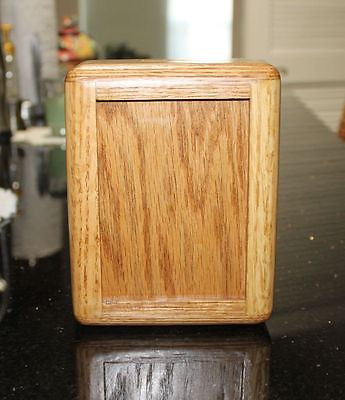
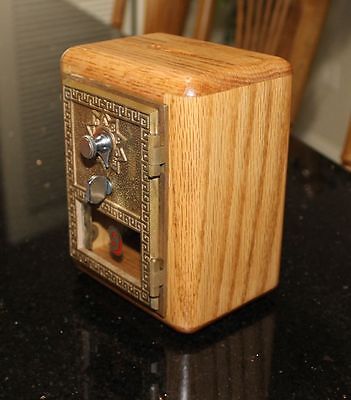
Let’s visualize a matching image pair.
pil_img = Image(filename=train_data[image_col_1][5])
display(pil_img)
pil_img = Image(filename=train_data[image_col_2][5])
display(pil_img)
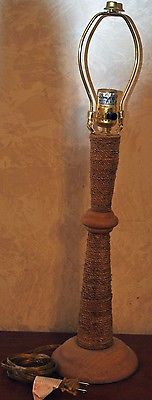
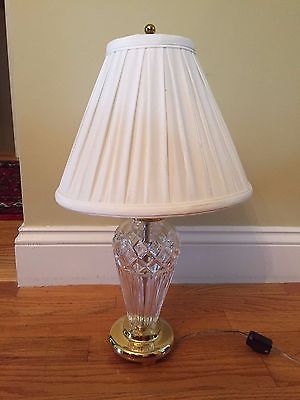
Here are two images that do not match.
pil_img = Image(filename=train_data[image_col_1][0])
display(pil_img)
pil_img = Image(filename=train_data[image_col_2][0])
display(pil_img)
Train your Model#
Ideally, we want to obtain a model that can return high/low scores for positive/negative image pairs. With AutoMM, we can easily train a model that captures the semantic relationship between images. Basically, it uses Swin Transformer to project each image into a high-dimensional vector and compute the cosine similarity of feature vectors.
With AutoMM, you just need to specify the query, response, and label column names and fit the model on the training dataset without worrying the implementation details.
from autogluon.multimodal import MultiModalPredictor
predictor = MultiModalPredictor(
        problem_type="image_similarity",
        query=image_col_1, # the column name of the first image
        response=image_col_2, # the column name of the second image
        label=label_col, # the label column name
        match_label=match_label, # the label indicating that query and response have the same semantic meanings.
        eval_metric='auc', # the evaluation metric
    )

# Fit the model
predictor.fit(
    train_data=train_data,
    time_limit=180,
)
INFO: Global seed set to 0
No path specified. Models will be saved in: "AutogluonModels/ag-20231113_090749"
AutoGluon infers your prediction problem is: 'binary' (because only two unique label-values observed).
	2 unique label values:  [0, 1]
	If 'binary' is not the correct problem_type, please manually specify the problem_type parameter during predictor init (You may specify problem_type as one of: ['binary', 'multiclass', 'regression'])
---------------------------------------------------------------------------
NotImplementedError                       Traceback (most recent call last)
Cell In[11], line 12
      2 predictor = MultiModalPredictor(
      3         problem_type="image_similarity",
      4         query=image_col_1, # the column name of the first image
   (...)
      8         eval_metric='auc', # the evaluation metric
      9     )
     11 # Fit the model
---> 12 predictor.fit(
     13     train_data=train_data,
     14     time_limit=180,
     15 )

File ~/autogluon/multimodal/src/autogluon/multimodal/predictor.py:460, in MultiModalPredictor.fit(self, train_data, presets, tuning_data, max_num_tuning_data, id_mappings, time_limit, save_path, hyperparameters, column_types, holdout_frac, teacher_predictor, seed, standalone, hyperparameter_tune_kwargs, clean_ckpts)
    458 else:
    459     teacher_learner = teacher_predictor._learner
--> 460 self._learner.fit(
    461     train_data=train_data,
    462     presets=presets,
    463     tuning_data=tuning_data,
    464     max_num_tuning_data=max_num_tuning_data,
    465     time_limit=time_limit,
    466     save_path=save_path,
    467     hyperparameters=hyperparameters,
    468     column_types=column_types,
    469     holdout_frac=holdout_frac,
    470     teacher_learner=teacher_learner,
    471     seed=seed,
    472     standalone=standalone,
    473     hyperparameter_tune_kwargs=hyperparameter_tune_kwargs,
    474     clean_ckpts=clean_ckpts,
    475     id_mappings=id_mappings,
    476 )
    478 return self

File ~/autogluon/multimodal/src/autogluon/multimodal/learners/matching.py:532, in MultiModalMatcher.fit(self, train_data, id_mappings, presets, tuning_data, time_limit, save_path, hyperparameters, column_types, holdout_frac, hyperparameter_tune_kwargs, seed, **kwargs)
    527     assert self._output_shape == output_shape, (
    528         f"Inferred output shape {output_shape} is different from " f"the previous {self._output_shape}"
    529     )
    531 if self._validation_metric_name is None or self._eval_metric_name is None:
--> 532     validation_metric_name, eval_metric_name = infer_metrics(
    533         problem_type=self._problem_type,
    534         is_matching=self._pipeline in matcher_presets.list_keys(),
    535         eval_metric_name=self._eval_metric_name,
    536     )
    537     minmax_mode = get_minmax_mode(validation_metric_name)
    538 else:

File ~/autogluon/multimodal/src/autogluon/multimodal/utils/metric.py:113, in infer_metrics(problem_type, eval_metric_name, validation_metric_name, is_matching)
    111         return validation_metric_name, eval_metric_name
    112     else:
--> 113         raise NotImplementedError(f"Problem type: {problem_type} is not yet supported for matching!")
    115 if eval_metric_name is not None:
    116     if eval_metric_name.lower() not in EVALUATION_METRICS[problem_type]:

NotImplementedError: Problem type: binary is not yet supported for matching!
Evaluate on Test Dataset#
You can evaluate the predictor on the test dataset to see how it performs with the roc_auc score:
score = predictor.evaluate(test_data)
print("evaluation score: ", score)
Predict on Image Pairs#
Given new image pairs, we can predict whether they match or not.
pred = predictor.predict(test_data.head(3))
print(pred)
The predictions use a naive probability threshold 0.5. That is, we choose the label with the probability larger than 0.5.
Predict Matching Probabilities#
However, you can do more customized thresholding by getting probabilities.
proba = predictor.predict_proba(test_data.head(3))
print(proba)
Extract Embeddings#
You can also extract embeddings for each image of a pair.
embeddings_1 = predictor.extract_embedding({image_col_1: test_data[image_col_1][:5].tolist()})
print(embeddings_1.shape)
embeddings_2 = predictor.extract_embedding({image_col_2: test_data[image_col_2][:5].tolist()})
print(embeddings_2.shape)
Other Examples#
You may go to AutoMM Examples to explore other examples about AutoMM.
Customization#
To learn how to customize AutoMM, please refer to Customize AutoMM.