AutoMM Detection - Quick Start with Foundation Model on Open Vocabulary Detection (OVD)#


In this section, our goal is to use a foundation model in object detection to detect novel classes defined by an unbounded (open) vocabulary.
Setting up the imports#
To start, let’s import MultiModalPredictor, and also make sure groundingdino is installed:
from autogluon.multimodal import MultiModalPredictor
try:
    import groundingdino
except ImportError:
    try:
        from pip._internal import main as pipmain
    except ImportError:
        from pip import main as pipmain  # for old pip version
    pipmain(['install', '--user', 'git+https://github.com/IDEA-Research/GroundingDINO.git'])  # equals to "!pip install git+https://github.com/IDEA-Research/GroundingDINO.git"
Prepare sample image#
Let’s use an image of Seattle’s street view to demo:
from IPython.display import Image, display
from autogluon.multimodal import download

sample_image_url = "https://live.staticflickr.com/65535/49004630088_d15a9be500_6k.jpg"
sample_image_path = download(sample_image_url)

display(Image(filename=sample_image_path))
Downloading 49004630088_d15a9be500_6k.jpg from https://live.staticflickr.com/65535/49004630088_d15a9be500_6k.jpg...
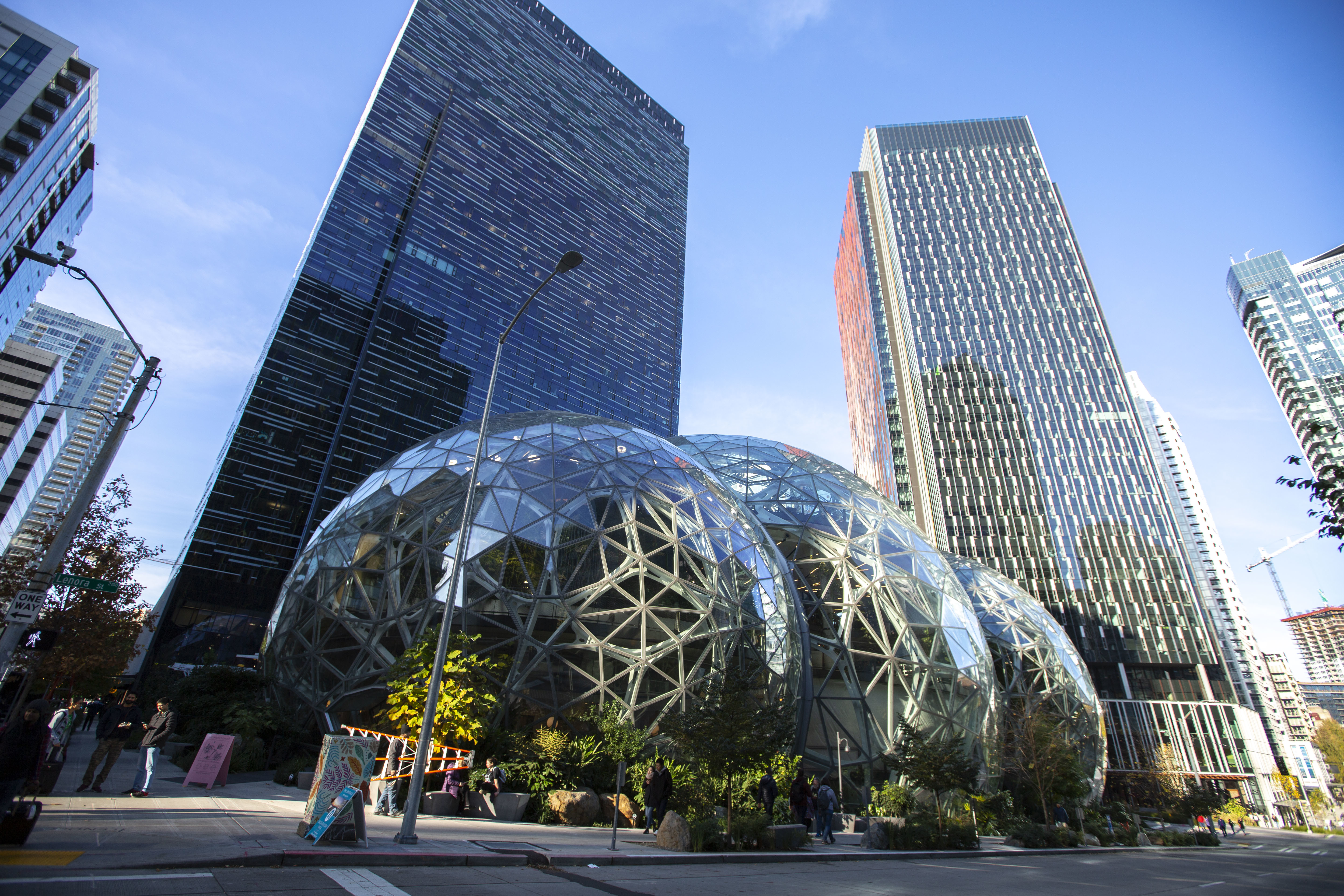
Creating the MultiModalPredictor#
We create the MultiModalPredictor and specify the problem_type to "open_vocabulary_object_detection".
We set the preset as "best_quality", which uses a SwinB as backbone. This preset gives us higher accuracy for detection.
We also provide presets "high_quality" and "medium_quality" with SwinT as backbone, faster but also with lower performance.
# Init predictor
predictor = MultiModalPredictor(problem_type="open_vocabulary_object_detection", presets = "best_quality")
Inference#
To run inference on the image, perform:
pred = predictor.predict(
    {
        "image": [sample_image_path],
        "prompt": ["Pink notice. Green sign. One Way sign. People group. Tower crane in construction. Lamp post. Glass skyscraper."],
    },
    as_pandas=True,
)

print(pred)
Downloading groundingdino_swinb_cogcoor.pth from https://github.com/IDEA-Research/GroundingDINO/releases/download/v0.1.0-alpha2/groundingdino_swinb_cogcoor.pth...
final text_encoder_type: bert-base-uncased
/home/ci/opt/venv/lib/python3.10/site-packages/torch/functional.py:504: UserWarning: torch.meshgrid: in an upcoming release, it will be required to pass the indexing argument. (Triggered internally at ../aten/src/ATen/native/TensorShape.cpp:3483.)
  return _VF.meshgrid(tensors, **kwargs)  # type: ignore[attr-defined]
/home/ci/opt/venv/lib/python3.10/site-packages/transformers/modeling_utils.py:881: FutureWarning: The `device` argument is deprecated and will be removed in v5 of Transformers.
  warnings.warn(
/home/ci/opt/venv/lib/python3.10/site-packages/torch/utils/checkpoint.py:31: UserWarning: None of the inputs have requires_grad=True. Gradients will be None
  warnings.warn("None of the inputs have requires_grad=True. Gradients will be None")
---------------------------------------------------------------------------
TypeError                                 Traceback (most recent call last)
Cell In[4], line 1
----> 1 pred = predictor.predict(
      2     {
      3         "image": [sample_image_path],
      4         "prompt": ["Pink notice. Green sign. One Way sign. People group. Tower crane in construction. Lamp post. Glass skyscraper."],
      5     },
      6     as_pandas=True,
      7 )
      9 print(pred)

File ~/autogluon/multimodal/src/autogluon/multimodal/predictor.py:614, in MultiModalPredictor.predict(self, data, candidate_data, id_mappings, as_pandas, realtime, save_results)
    579 def predict(
    580     self,
    581     data: Union[pd.DataFrame, dict, list, str],
   (...)
    586     save_results: Optional[bool] = None,
    587 ):
    588     """
    589     Predict values for the label column of new data.
    590
   (...)
    612     Array of predictions, one corresponding to each row in given dataset.
    613     """
--> 614     return self._learner.predict(
    615         data=data,
    616         candidate_data=candidate_data,
    617         as_pandas=as_pandas,
    618         realtime=realtime,
    619         save_results=save_results,
    620         id_mappings=id_mappings,
    621     )

File ~/autogluon/multimodal/src/autogluon/multimodal/learners/base.py:1891, in BaseLearner.predict(self, data, candidate_data, as_pandas, realtime, **kwargs)
   1885 else:
   1886     outputs = self.predict_per_run(
   1887         data=data,
   1888         requires_label=False,
   1889         realtime=realtime,
   1890     )
-> 1891     logits = extract_from_output(outputs=outputs, ret_type=ret_type)
   1893     if self._df_preprocessor:
   1894         pred = self._df_preprocessor.transform_prediction(
   1895             y_pred=logits,
   1896         )

File ~/autogluon/multimodal/src/autogluon/multimodal/utils/inference.py:61, in extract_from_output(outputs, ret_type, as_ndarray)
     59 if ret_type == LOGITS:
     60     logits = [ele[LOGITS] for ele in outputs]
---> 61     ret = torch.cat(logits).nan_to_num(nan=-1e4)
     62 elif ret_type == PROBABILITY:
     63     probability = [ele[PROBABILITY] for ele in outputs]

TypeError: expected Tensor as element 0 in argument 0, but got list
The output pred is a pandas DataFrame that has two columns, image and bboxes.
In image, each row contains the image path
In bboxes, each row is a list of dictionaries, each one representing the prediction for an object in the image: {"class": <predicted_class_name>, "bbox": [x1, y1, x2, y2], "score": <confidence_score>}, for example:
print(pred["bboxes"][0][0])
!pip install opencv-python
To visualize results, run the following:
from autogluon.multimodal.utils import Visualizer

conf_threshold = 0.2  # Specify a confidence threshold to filter out unwanted boxes
image_result = pred.iloc[0]

img_path = image_result.image  # Select an image to visualize

visualizer = Visualizer(img_path)  # Initialize the Visualizer
out = visualizer.draw_instance_predictions(image_result, conf_threshold=conf_threshold)  # Draw detections
visualized = out.get_image()  # Get the visualized image

from PIL import Image
from IPython.display import display
img = Image.fromarray(visualized, 'RGB')
display(img)
Other Examples#
You may go to AutoMM Examples to explore other examples about AutoMM.
Customization#
To learn how to customize AutoMM, please refer to Customize AutoMM.
Citation#
@misc{liu2023grounding,
      title={Grounding DINO: Marrying DINO with Grounded Pre-Training for Open-Set Object Detection},
      author={Shilong Liu and Zhaoyang Zeng and Tianhe Ren and Feng Li and Hao Zhang and Jie Yang and Chunyuan Li and Jianwei Yang and Hang Su and Jun Zhu and Lei Zhang},
      year={2023},
      eprint={2303.05499},
      archivePrefix={arXiv},
      primaryClass={cs.CV}
}