autogluon.core.searcher
Example
Define a dummy training function with searchable spaces:
>>> import numpy as np
>>> import autogluon.core as ag
>>> @ag.args(
...     lr=ag.space.Real(1e-3, 1e-2, log=True),
...     wd=ag.space.Real(1e-3, 1e-2))
>>> def train_fn(args, reporter):
...     print('lr: {}, wd: {}'.format(args.lr, args.wd))
...     for e in range(10):
...         dummy_accuracy = 1 - np.power(1.8, -np.random.uniform(e, 2*e))
...         reporter(epoch=e+1, accuracy=dummy_accuracy, lr=args.lr, wd=args.wd)
Note that epoch returned by reporter must be the number of epochs done, and start with 1. Recall that a searcher is used by a scheduler in order to suggest configurations to evaluate. Create a searcher and sample one configuration:
>>> searcher = ag.searcher.GPFIFOSearcher(train_fn.cs)
>>> searcher.get_config()
{'lr': 0.0031622777, 'wd': 0.0055}
Create a scheduler and run this toy experiment:
>>> scheduler = ag.scheduler.FIFOScheduler(train_fn,
...                                        searcher=searcher,
...                                        resource={'num_cpus': 2, 'num_gpus': 0},
...                                        num_trials=10,
...                                        reward_attr='accuracy',
...                                        time_attr='epoch')
>>> scheduler.run()
Note that reward_attr and time_attr must correspond to the keys used in the reporter callback in train_fn.
When working with FIFOScheduler or HyperbandScheduler, it is strongly recommended to have the scheduler create its searcher (by specifying searcher (string identifier) and search_options), instead of creating the searcher object by hand:
>>> scheduler = ag.scheduler.FIFOScheduler(train_fn,
...                                        searcher='bayesopt',
...                                        resource={'num_cpus': 2, 'num_gpus': 0},
...                                        num_trials=10,
...                                        reward_attr='accuracy',
...                                        time_attr='epoch')
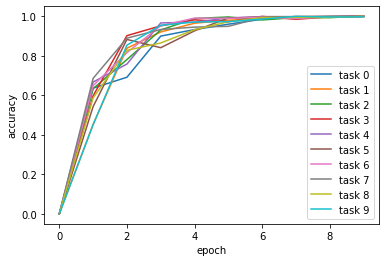
Visualize the results:
>>> scheduler.get_training_curves(plot=True)